SharePoint Implementation Cost: Full Breakdown for Enterprises
Discover the true cost of an enterprise SharePoint implementation. Learn how to structure your budget, avoid hidden expenses, and turn your IT spend into a long-term strategic investment.
What enterprise leaders need to understand before they approve the budget
The first question leadership asks when a SharePoint implementation is proposed is almost always: how much will this cost? It is the right question. It is also, in most cases, answered incorrectly not because implementation partners are dishonest, but because the cost of a SharePoint implementation is genuinely difficult to estimate without a framework for understanding what drives it.
This article provides that framework. Not a price list SharePoint implementations are too context-dependent for generic pricing to be meaningful but a strategic breakdown of the cost components that matter, the decisions that drive them up or down, and the thinking that separates organizations that get strong return on their SharePoint investment from those that spend significantly more than they should.
The Fundamental Cost Mistake Most Organizations Make
Before breaking down the numbers, it is worth naming the most common strategic error in SharePoint cost planning: treating the implementation as a one-time project rather than a long-term operational investment.
Organizations consistently focus their budget conversation on the initial build the licensing, the configuration, the migration and underplan for everything that follows. In practice, the total cost of a SharePoint environment over three years is typically one and a half to two times the initial implementation cost, when you account for support, ongoing development, training refresh cycles, and platform evolution.
The organizations that get the best value from SharePoint are those that plan for the full ownership horizon from the outset not those that optimize for the lowest possible initial invoice.
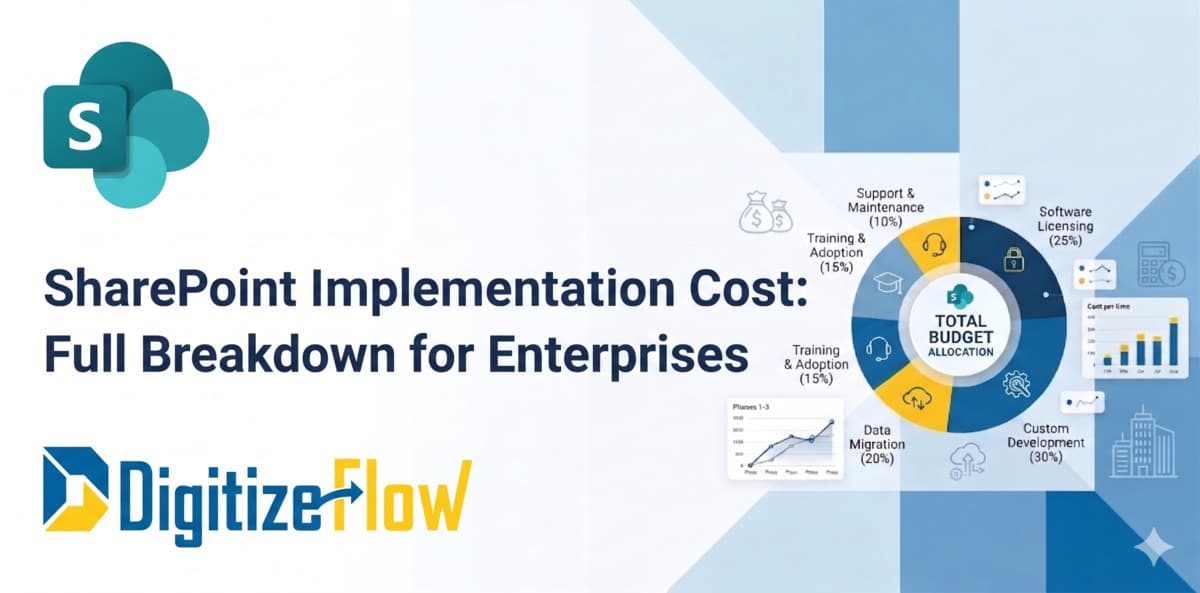
The Five Cost Components of a SharePoint Implementation
1. Software Licensing 20% to 30% of Total Budget
Microsoft SharePoint Online is included in Microsoft 365 Business Standard and above, as well as in Microsoft 365 E3 and E5 enterprise plans. For organizations already running Microsoft 365, incremental SharePoint licensing cost may be minimal or zero, depending on the existing subscription tier.
Where licensing costs escalate is in the adjacent services that a mature SharePoint implementation typically requires. Power Automate Premium connectors, Power Apps per-user licenses, Microsoft Syntex for AI-powered document processing, and Azure Active Directory P2 for advanced governance features all carry additional costs beyond the base Microsoft 365 subscription. These are not optional extras for enterprise-grade deployments, they are often necessary capabilities. Budgeting for licensing without accounting for the full ecosystem cost is one of the most reliable ways to encounter unexpected expenses mid-project.
2. Custom Development 25% to 35% of Total Budget
This is typically the largest single cost component and the one with the widest variance. Out-of-the-box SharePoint provides a functional foundation. What transforms it into an enterprise-grade system tailored to your specific business processes is custom development and the scope of that development is where budget conversations most often diverge from reality.
Custom development in a SharePoint context includes building custom web parts and page layouts that match your brand and functional requirements, developing Power Automate workflows for document approvals, notifications, and process automation, creating Power Apps forms and portals that replace manual paper or email processes, building custom search configurations and metadata schemas, and integrating SharePoint with external systems such as ERP platforms, HR systems, and CRM tools.
The cost driver in this component is almost never the technology. It is the clarity of requirements going into the build phase. Organizations that invest in thorough discovery and process mapping before development begins consistently spend less on development than organizations that define requirements iteratively during the build because iteration in development is expensive, and rework is the most reliable way to exceed a SharePoint project budget.
3. Data Migration 15% to 25% of Total Budget
Data migration is the component most consistently underestimated in the initial budget conversation. Moving documents from file servers, legacy intranets, email archives, or third-party document management systems into SharePoint is not a technical lift — it is a strategic project in its own right.
The complexity of migration is driven by volume, by the quality of the existing metadata structure, and by how much rationalization needs to happen before content arrives in the new environment. Organizations that have maintained disciplined file structures and consistent naming conventions migrate faster and cheaper than those with years of accumulated, poorly organized content spread across multiple locations.
The hidden cost in migration is the human time required for content review and governance decisions. Before content migrates, someone with business authority needs to decide what to keep, what to archive, what to delete, and how incoming content should be tagged in the new metadata structure. This is not a technical task it is an organizational one, and it takes more time than most implementations initially plan for.
4. Training and Adoption 10% to 20% of Total Budget
This is the component that most directly determines whether a SharePoint implementation delivers its intended business value and it is the component most frequently cut when budgets come under pressure. The consequences of that cut are predictable and expensive.
A SharePoint environment that employees do not understand, do not trust, or do not find intuitive will revert to the old way of working within weeks of go-live. Email chains replace document collaboration. Shared drives replace SharePoint libraries. The investment in the platform generates no return because the platform generates no adoption.
Effective adoption investment is not a single training session on launch day. It is role-based training that addresses how each user group executives, managers, contributors, read-only users interacts with the system differently. It is change management communication that explains why the new system exists and what problem it solves. And it is a feedback mechanism in the first sixty to ninety days that surfaces friction points early enough to address them before they become embedded habits.
5. Support and Maintenance 10% to 15% of Annual Budget Ongoing
Once a SharePoint environment is live, it requires ongoing maintenance. Microsoft updates the platform continuously new features, changed behaviors, occasional deprecations and an enterprise SharePoint environment needs to be managed in response to that evolution. New departments will request new sites. Workflows will need adjustment as processes change. Permissions will need review as organizational structures shift.
Organizations that plan for a structured support arrangement whether through an internal resource with dedicated SharePoint responsibility or through an ongoing partner relationship maintain healthier, more capable environments than those that treat SharePoint as a set-and-forget system. The platforms that fail to deliver long-term value are almost always those that received no post-launch investment.
What Actually Determines Your Specific Cost
Given those five components, what determines where your implementation falls within each range? Four variables drive the final number more than any other.
The first is organizational scale. The number of users, sites, and departments in scope scales cost in a relatively linear way more users means more licensing, more training, more migration volume, and more complex permission architecture.
The second is process complexity. An organization that wants SharePoint as a document library with basic permissions is a fundamentally different project from one that wants SharePoint as the backbone of a multi-department approval and compliance system with automated workflows, custom portals, and Power BI dashboards. The gap between these two implementations in cost and timeline is significant.
The third is the state of existing content. Organizations with clean, well-organized existing document structures migrate faster and cheaper. Organizations with decades of unstructured content spread across legacy systems face a substantially higher migration investment.
The fourth is implementation partner expertise. This is the variable organizations most frequently underweight. A SharePoint implementation delivered by a partner with genuine enterprise experience and a structured methodology costs more per hour and dramatically less per outcome than one delivered by a generalist IT vendor treating SharePoint as a standard infrastructure project. The quality of the architecture decisions made in the first weeks of an implementation determines the maintainability and performance of the environment for years.
The Strategic Frame: Cost as Investment, Not Expense
The organizations that approach SharePoint implementation cost with the most clarity are those that frame it as an investment with a measurable return, not as an IT expense to be minimized.
The return on a well-implemented SharePoint environment is real and quantifiable. Document retrieval time reduces from minutes to seconds across thousands of daily searches. Approval cycles that previously took days complete in hours. Compliance documentation that required manual assembly generates automatically as a byproduct of normal workflow. New employee onboarding processes that previously took weeks of coordinator time run as structured digital workflows.
Digitize Flow approaches SharePoint implementation budgeting from this investment perspective. Before a project scope is defined, we work with client leadership to identify the specific operational outcomes the implementation is intended to drive reduced approval cycle time, improved audit readiness, faster document access, eliminated manual processes and to establish how those outcomes will be measured. The budget conversation then becomes a conversation about what level of investment is proportionate to the value those outcomes represent, rather than a negotiation over line items.
Frequently Asked Questions
What is a realistic total budget range for an enterprise SharePoint implementation?
For a mid-size enterprise five hundred to two thousand users covering a core intranet, document management, and basic workflow automation, a realistic total implementation budget ranges from forty thousand to one hundred twenty thousand dollars, with ongoing annual support costs of fifteen to twenty-five thousand dollars. Large enterprise implementations with complex integrations, multi-geography rollouts, and extensive custom development can significantly exceed these ranges. The only way to produce a number that is meaningful for your specific context is through a structured discovery engagement.
Can we reduce costs by using out-of-the-box SharePoint without customization?
Yes, and for some organizations this is the right decision. A lean SharePoint implementation using standard features, minimal custom development, and a disciplined metadata approach can be delivered at a fraction of the cost of a fully customized environment. The trade-off is functional fit standard SharePoint will not match your specific process requirements as precisely as a customized implementation. The organizations best served by minimal customization are those with relatively straightforward document management needs and the organizational discipline to adapt their processes to the platform rather than the reverse.
How do we evaluate whether a SharePoint implementation partner's pricing is reasonable?
The most useful evaluation criterion is not the hourly rate it is the methodology. A partner who begins with a structured discovery phase, produces a detailed information architecture before any build begins, and can clearly articulate how their design decisions will affect long-term maintainability is worth a premium over a partner who quotes a lower rate and begins configuration immediately. The cost of a poorly architected SharePoint environment in rework, performance issues, user frustration, and eventual rebuild consistently exceeds any initial savings from a lower-cost implementation.
The Decision That Determines Everything Else
How much does a SharePoint implementation cost? Enough to matter, and enough to justify getting it right the first time.
The organizations that spend the least on SharePoint over a five-year horizon are not those that negotiated the lowest initial implementation cost. They are those that invested properly in architecture, migration quality, and adoption and then maintained the environment with appropriate ongoing support. The organizations that spend the most are those that under-invested initially, experienced the predictable failures that follow, and eventually rebuilt what should have been built correctly the first time.
The framework in this article gives you the structure to have a more informed budget conversation one focused on outcomes rather than line items, and on total ownership cost rather than initial project spend. That conversation, had clearly at the beginning of the process, is what separates SharePoint implementations that deliver lasting value from those that become expensive cautionary tales.Before committing to SharePoint, it is worth comparing it against enterprise content management alternatives. Our analysis of SharePoint vs FileNet vs OpenText breaks down the key differences for large organizations. If you are also evaluating your broader development strategy alongside the platform choice, read our guide on Power Platform vs Traditional Development.