How AI is Transforming SharePoint and Microsoft 365?
AI is no longer a future promise it is actively reshaping enterprise productivity today. Discover how Microsoft Copilot and Syntex are eradicating manual inefficiencies, upgrading SharePoint document management, and transforming business operations.
AI is not just arriving in Microsoft 365!
It is already actively reshaping how enterprise productivity is defined and achieved.
Over the past two decades, enterprise software has steadily evolved. Applications became faster, interfaces more intuitive, and cloud technologies made access seamless. Yet the core model remained consistent: humans handled the thinking, while software supported organization and storage.
Today, the integration of artificial intelligence into Microsoft 365 and SharePoint marks a meaningful evolution of that model.
This is not a superficial enhancement. AI is now augmenting human capabilities by assisting in tasks that once relied entirely on manual effort reading documents, identifying key insights, classifying content, summarizing discussions, drafting communications, and proactively surfacing relevant information.
For enterprise leaders and IT decision-makers, this creates an important opportunity. The question is no longer whether AI will transform the Microsoft 365 environment, but how effectively organizations can position themselves to maximize its value and impact.
The Architecture of AI in Microsoft 365
AI in Microsoft 365 is designed to be seamlessly integrated, not added as a separate layer. Microsoft is embedding intelligent capabilities directly into the tools employees already use daily.
At the center of this transformation is Microsoft Copilot, powered by advanced language models and connected to organizational data through Microsoft Graph.
This ensures that AI-generated outputs are grounded in real business context documents, communications, and workflows unique to each organization making it highly relevant and actionable.
Alongside Copilot, Microsoft Syntex enhances SharePoint by introducing intelligent content services. It brings capabilities such as document understanding, automated classification, metadata generation, and compliance support.
Together, Copilot and Syntex represent a powerful foundation for AI-driven productivity within Microsoft 365.
What AI Is Enabling Inside SharePoint
Automatic Document Classification and Metadata Enhancement
One of the longstanding challenges in document management has been maintaining consistent and high-quality metadata. Manual input often leads to gaps or inconsistencies.
With AI-powered document understanding, SharePoint can now automatically analyze incoming files, identify their type, extract key information, and apply accurate metadata at the moment of upload.
Contracts, for example, can be recognized instantly, with key fields such as vendor name, value, and dates captured automatically.
This significantly improves consistency, reduces manual effort, and enhances the overall reliability of the document management system.
Intelligent Search with Context Awareness
Traditional search relies heavily on exact keywords. AI-enhanced search introduces a more advanced, intent-based approach.
Users can now search using concepts rather than exact phrases, and the system can identify and return relevant documents based on meaning and context.
This creates a more intuitive and efficient search experience, helping users quickly locate the information they need.
Content Summarization and Generation
AI capabilities within SharePoint allow users to quickly summarize large volumes of content, generate new documents based on existing materials, and extract key insights from complex reports.
This reduces time spent on repetitive tasks and allows employees to focus more on analysis, decision-making, and strategic work.
AI-Driven Compliance and Records Management
Compliance processes, particularly in regulated industries, often require significant manual effort.
AI now supports these processes by automatically identifying sensitive content, applying appropriate classifications, and managing retention policies. This enhances accuracy, reduces risk, and allows compliance teams to focus on higher-value oversight activities.
AI Across the Microsoft 365 Ecosystem
Microsoft Teams: Smarter Meetings
AI enhances collaboration by capturing meeting discussions, generating real-time transcriptions, identifying key decisions, and producing structured summaries.
This ensures that meetings are more productive, follow-ups are clearer, and information is accessible even for those who could not attend.
Beyond Office Applications
AI Revolutionizing the Power Platform SharePoint rarely operates in isolation.
For most enterprises, it acts as the central repository connected to a much broader ecosystem driven by the Microsoft Power Platform. The introduction of AI into Power Automate, Power Apps, and Power BI is fundamentally changing how business processes are designed, automated, and analyzed.
In Power Automate, AI is replacing the need for complex, manual workflow mapping.
Users can now simply describe a desired process in natural language such as "create a workflow that extracts contract attachments from emails, routes them to a specific SharePoint folder, and alerts the legal team for review" and the AI generates the required flow architecture.
This addresses a major organizational bottleneck: the heavy reliance on IT departments to build and maintain routine automations.
Similarly, in Power Apps, AI accelerates application development by allowing teams to build functional internal tools to interact with their SharePoint lists and document libraries using conversational prompts. In Power BI, Copilot transforms how teams interact with raw data.
It enables decision-makers to ask complex questions about their operational metrics and instantly generates executive-ready dashboards and visual summaries, eliminating the need to master complex DAX formulas. This interconnected AI experience ensures that productivity gains extend far beyond reading and writing documents they optimize how entire business operations scale.
AI in Word, Excel, and Outlook
Across core applications, AI is transforming everyday tasks:
In Word, it supports drafting, editing, and summarization
In Excel, it enables data analysis and insight generation through natural language
In Outlook, it helps manage communication by summarizing threads and suggesting responses
These capabilities streamline workflows and allow professionals to focus more on meaningful work rather than administrative tasks.
Strategic Implications for Organizations
AI in Microsoft 365 presents a significant opportunity for organizations to operate more efficiently and intelligently.
However, realizing this value depends on how well the organization is prepared.
Three key factors influence success :
Data Quality
Well-structured, organized, and properly governed data allows AI to deliver accurate and meaningful results.
Adoption and Enablement
Employees need to understand how to use AI tools effectively and integrate them into their daily workflows.
Architectural Readiness
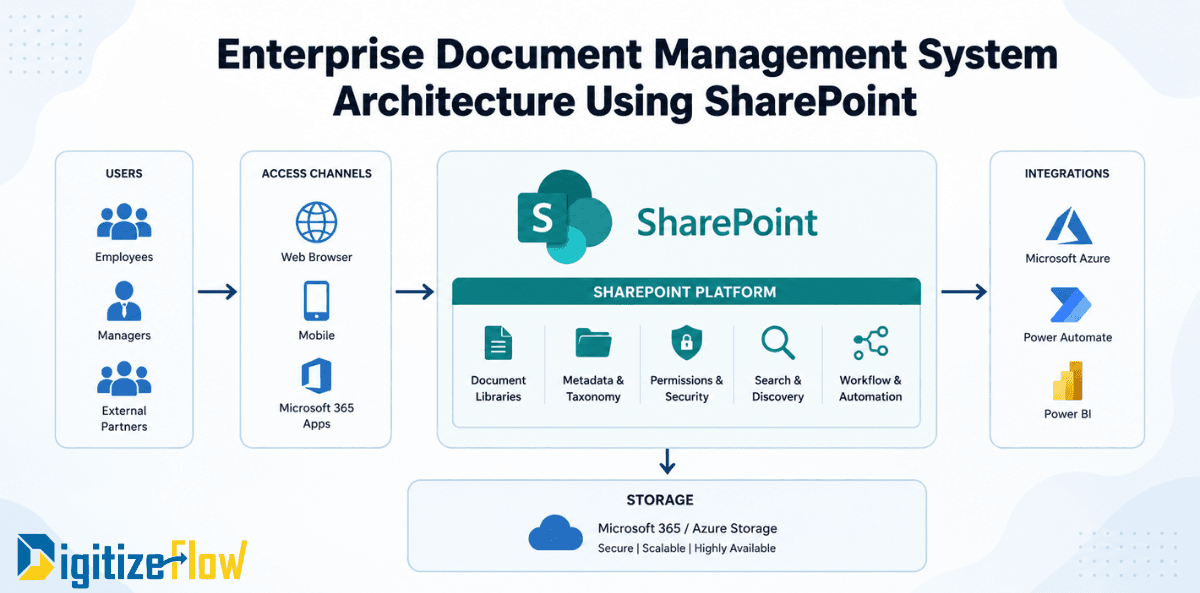
A strong foundation well-designed SharePoint architecture, connected systems, and clear governance ensures AI can operate at its full potential.
Addressing the Real-World Bottlenecks
Eradicating Manual Inefficiencies To understand the true strategic value of this AI shift, it helps to look at the daily friction points that quietly drain enterprise resources and frustrate knowledge workers. The most prevalent of these are unorganized document silos and the repetitive burden of manual data entry.
Before AI, managing an influx of daily vendor documents or migrating legacy files meant dedicating hours of tedious data entry just to ensure those files were searchable. Teams often resorted to keeping local copies of files because the central repository was too cluttered and unorganized to navigate efficiently. This inevitably created dangerous data silos, version control conflicts, and severe compliance risks.
AI directly targets these inefficiencies. By automating the classification and metadata tagging processes at the point of upload, the system eliminates the human error and fatigue inherent in manual data entry. It transforms unstructured, chaotic file shares into highly organized, easily queryable knowledge centers. When the system handles the cognitive heavy lifting of organizing and tagging, employees no longer spend their time managing work; they spend their time executing it.
Where Digitize Flow Adds Value
Organizations often seek guidance not on the technology itself, but on readiness.
Digitize Flow focuses on assessing current environments, identifying gaps in data structure and governance, and creating a clear roadmap for AI enablement.
This ensures that AI adoption is both effective and aligned with business objectives.
Frequently Asked Questions
Does Microsoft Copilot require a separate license?
Yes, it is offered as an add-on, providing advanced AI capabilities to existing Microsoft 365 subscriptions.
How is data protected?
AI operates within the organization’s secure environment, respecting existing permissions and compliance policies.
When can organizations expect results?
Organizations with strong foundations can begin seeing value within weeks, while others may require a structured preparation phase to unlock full benefits.
Conclusion
AI is already transforming Microsoft 365 and SharePoint. The real advantage lies not just in accessing these technologies, but in using them effectively.
Organizations that invest in data quality, strong architecture, and user adoption will unlock meaningful productivity gains and create a more intelligent, efficient way of working.