Why Your Current Document Management System Is Costing You Millions?
Discover the hidden costs of your legacy Document Management System. Learn how search time, version confusion, and approval latency are silently costing your organization millions—and how to fix it using the Microsoft 365 tools you already own.
No finance department has ever received an invoice for a bad document management system. That is exactly why the bill keeps growing.
The licence renewal shows up on the P&L. The storage line shows up. The support contract shows up. Everything else, the hours your engineers spend hunting for the approved revision, the submittal that sat in a queue for nine days, the drawing that got built from a superseded file, gets absorbed silently into salaries, project overruns and "that is just how it works here."
This article is about making that invisible invoice visible. Not with vendor statistics you cannot verify, but with arithmetic you can run against your own headcount this afternoon.
The two costs of a document system
Every document management system has a price and a cost, and they are not related.
The price is what procurement negotiated: licences, implementation, annual maintenance. It is a known number, budgeted and approved.
The cost is what the organization pays every single working day because the system does not fit how work actually happens. It has no line item, no owner and no renewal date. It compounds quietly with every new project, every new employee and every new folder someone creates because they could not find the right one.
Organizations obsess over the first number and never measure the second.
The six line items on the invoice nobody sends you
1. Search time, the biggest single item
This is the one that dwarfs everything else, and it is the easiest to quantify.
Ask a project engineer, a contracts administrator or a QA officer how long it takes to locate the current approved version of a document, confirm it is actually current, and be confident enough to act on it. Not the optimistic answer. The honest one, including the two follow-up messages to colleagues and the wait for a reply. Then multiply: that number is per person, per day, five days a week, fifty weeks a year.
2. Rework from the wrong version
Search time is annoying. Version confusion is expensive.
When a shop drawing gets marked up against a superseded revision, when a subcontractor builds from a file that was replaced two weeks ago, when a tender submission goes out with last quarter's rate schedule, the cost is not measured in minutes. It is measured in scrap, resubmission, site correction and credibility.
A system that allows two people to hold two different "final" files is not a document management system. It is a filing cabinet with a login screen.
3. Approval latency
Split any document-heavy process in your organization into two parts: time spent doing work, and time spent waiting. In most legacy environments the waiting is four to five times the working. A transmittal that needs three signatures does not take three hours, it takes nine days, because approvals live in inboxes where they compete with everything else in an inbox. Nobody is being slow. The system simply has no mechanism to make a pending decision visible, escalate it, or reassign it when the approver is on leave.
On a construction or infrastructure programme that latency has a direct price. One avoidable week of slippage on a single package, on a contract carrying 10,000 dollars per day in delay exposure, is 70,000 dollars from a delay nobody caused and nobody recorded.
4. Compliance and audit exposure
Ask your quality or compliance lead how long it takes to assemble a complete evidence pack for an audit: who approved what, when, against which revision, with the full trail intact.
If the answer involves the word "reconstruct," you are not paying an audit cost, you are carrying an audit risk, and the two behave differently. A cost is a number. A risk is a number multiplied by a probability you do not control. For anyone operating under ISO 9001, ISO 19650 or client-mandated document control procedures, an incomplete trail is not an inconvenience. It is a finding.
5. Paying twice for the same capability
This one is pure waste and it is extremely common.
Most organizations in the region already hold Microsoft 365 licences. Those licences already include SharePoint, Power Automate, Teams, enterprise search, retention policies, sensitivity labels and audit logging. Then a separate document management platform gets purchased on top, at 20 to 40 dollars per user per month, to deliver a subset of what has already been bought.
Four hundred users at 20 dollars per month is 96,000 dollars a year. At 40 dollars it is 192,000 dollars a year. Every year. For infrastructure sitting unused in the tenant next door.
6. Shadow systems, the cost of being worked around
The final line item is the most telling one, because it is a verdict.
When people cannot work inside the official system, they do not stop working. They route around it: WhatsApp groups for drawings, personal OneDrive folders for working files, email threads as the real version history, a network drive that has quietly become the actual source of truth. Every workaround is corporate knowledge sitting outside your governance, your backup policy and your retention rules, and it walks out of the building the day that employee resigns.
Run the numbers on your own organization
Here is a simple model. Replace every assumption with your own figures.
Search and re-creation. 400 users losing 45 minutes a day, at 15 dollars per hour fully loaded, across 240 working days: 1,080,000 dollars a year.
Rework from version errors. 100 project staff losing 2 hours a week, at 20 dollars per hour, across 48 weeks: 192,000 dollars a year.
Approval latency. Two packages a year slipping one week, on a contract carrying 10,000 dollars per day in delay exposure: 140,000 dollars a year.
Duplicate platform licensing. 400 users on an add-on DMS at 20 dollars per user per month, delivering what your Microsoft licences already cover: 96,000 dollars a year.
Audit evidence assembly. Three audits a year at 200 hours each, at 25 dollars per hour: 15,000 dollars a year.
That comes to roughly 1.5 million dollars a year, against a renewal invoice of perhaps 80,000. Cut every assumption in half and you are still looking at three quarters of a million. That ratio is the entire argument, and it holds at almost any headcount above 150 people.
Two things are worth noticing. First, only one of those six items ever appears in a budget discussion. Second, the largest number is not a technology cost at all. It is payroll being spent on activity that produces nothing.
Five signs your system has crossed from asset to liability
Search does not work and everyone knows it. People navigate by folder path from memory instead of searching, or they ask a colleague. Search is the primary interface of any document system. If it is unreliable, nothing else in the product matters.
Metadata is optional in practice. The fields exist. They are empty, or filled with "N/A", or filled inconsistently by every department. Uncontrolled metadata means no reliable filtering, no automated routing and no meaningful reporting.
The system has no idea what stage a document is in. It stores files. It cannot tell you what is pending, with whom, for how long, or what is overdue. Storage without process is an archive, not a management system.
Every integration is a project. Connecting the DMS to your ERP, your Teams channels or your BI reporting requires custom middleware and a vendor quotation, so it never happens. The documents stay isolated from the processes that need them.
Adoption is enforced rather than chosen. If compliance depends on reminders, escalations and monthly nagging, the system has already lost. People adopt tools that make their day easier and evade tools that do not, regardless of policy.
Three or more of these and you are not maintaining a system. You are subsidizing one.
Why "we already have SharePoint" is the most expensive sentence in IT
It is also, in a narrow sense, true. And that is what makes it dangerous.
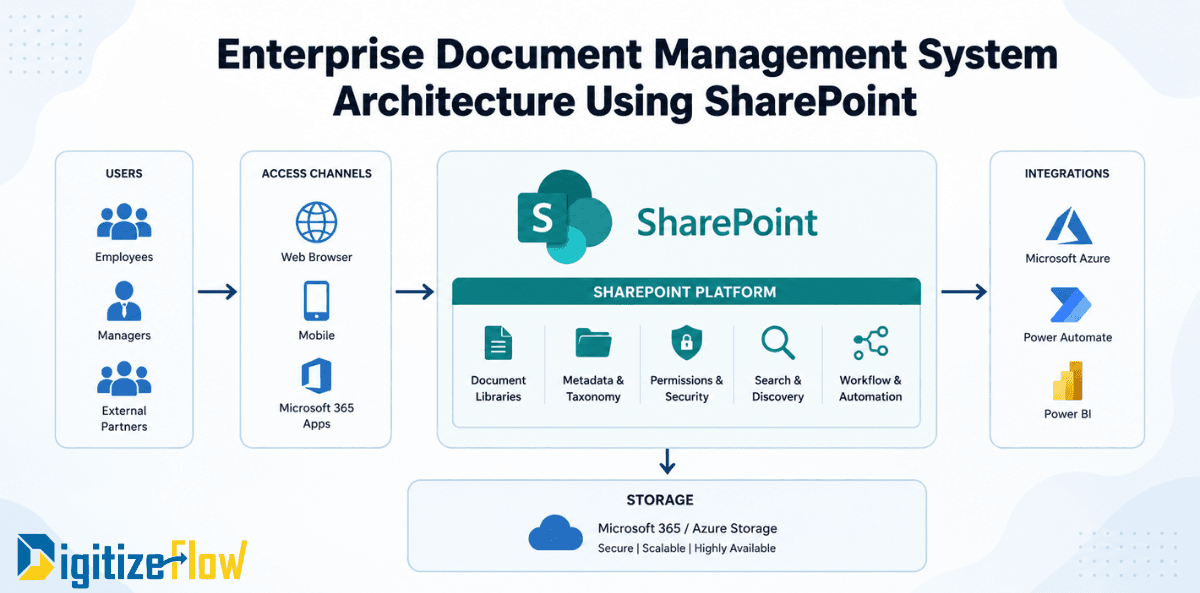
You do have SharePoint. What you have is a platform: world-class infrastructure, enterprise-grade security, an identity model already wired to your organization, automation and reporting engines already licensed. What you do not have is a document management solution, because SharePoint out of the box is a construction kit, not a finished product.
This is where most in-house attempts die. A team is told to "just use SharePoint," builds a few libraries, discovers that document control for a projects business needs revision schemes, transmittals, controlled numbering, distribution matrices, review cycles and a hundred small rules that mirror how the business actually runs, and eight months later the effort is abandoned in favour of buying yet another closed platform. Now the organization pays for both.
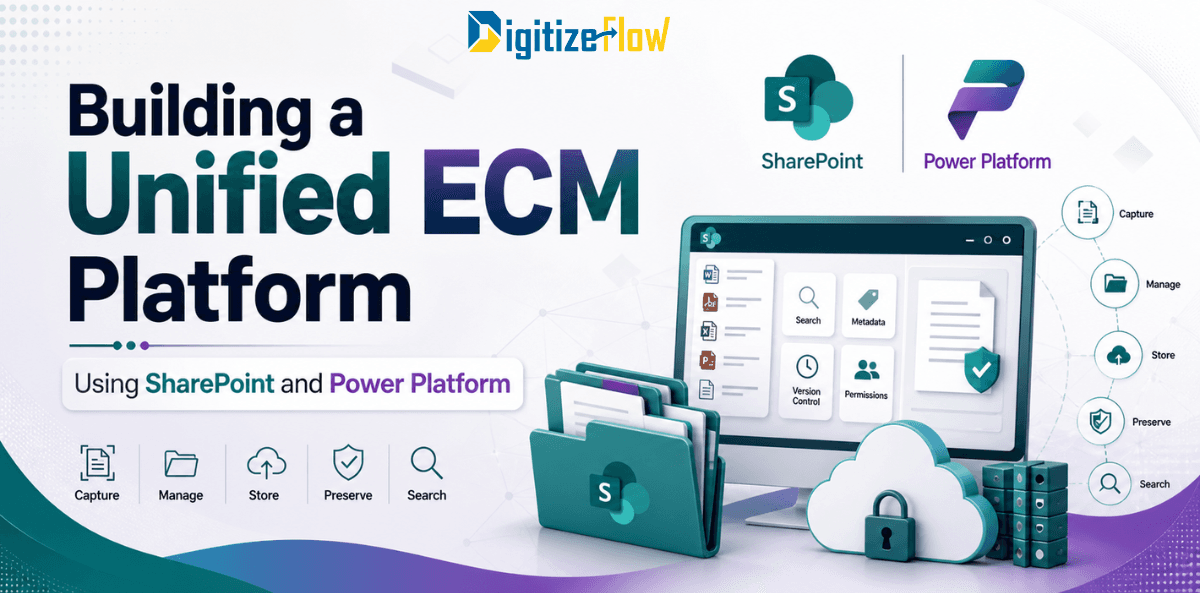
The correct third option is neither "raw SharePoint" nor "another silo." It is a solution built on top of the Microsoft platform you already own, pre-configured for how document-heavy organizations in this region actually operate.
That means:
Controlled document numbering, revision and status models that match your procedures rather than a generic template
Review and approval workflows with visible queues, delegation, escalation and full audit trail
Metadata enforced at upload, so search and reporting are reliable by construction
Permissions inherited from your existing Microsoft identity model, not maintained twice
Interfaces designed for site engineers and document controllers, not for SharePoint administrators
Native presence inside Teams, Outlook and Office, because that is where the work already happens
The economics are straightforward. Infrastructure and security come from licences already paid for. The investment goes entirely into fit, which is the only part that determines whether people use it.
The migration objection, answered
"We cannot move. Twenty years of documents are in the old system."
Understandable, and worth taking seriously. It is also the argument that guarantees another five years of the invoice above.
Migration is a solved engineering problem and it is rarely all-or-nothing. Legacy content can be moved with metadata and version history preserved, mapped into the new structure, and validated by reconciliation reports before anything is switched off. Historical archives can stay read-only while new work starts clean on day one, and departments can move in sequence rather than in one high-risk cutover.
The genuine risk is not the file transfer. It is migrating a broken structure into a new system and calling it a project. Fix the taxonomy, numbering and workflow design first, then move the content into it.
Where to start, first 90 days
Days 1 to 30, measure. Pick one document-heavy process. Record how long people spend locating documents, how many revisions are in circulation, and the split between working time and waiting time in the approval cycle. You now have a baseline instead of an opinion.
Days 31 to 60, design. Define the document types, numbering convention, metadata schema, revision model and approval matrix for that one process. Resist the urge to boil the ocean. One process done properly becomes the template for the rest.
Days 61 to 90, pilot. Deploy for one department on your existing Microsoft 365 tenant, migrate a bounded set of live documents, and measure the same metrics again. A pilot that produces a before-and-after number is worth more than any vendor demonstration, and it is the only artefact that reliably unlocks budget for a full rollout.
The decision you are already making
Doing nothing is not neutral. It is a decision to keep paying the invoice in this article, quarter after quarter, in productivity, rework, delay and risk instead of in capital expenditure. The uncomfortable part is that most of the money is already spent: the licences are owned and the infrastructure is running. What is missing is the layer that turns a platform into a system your teams actually want to use.
Digitize Flow builds document management solutions on top of Microsoft 365 and SharePoint for projects, contracting and enterprise organizations across the Middle East. Instead of buying another silo or spending a year building from scratch, you get a ready solution tailored to your document control procedures, running on the platform you already pay for.
Book a document management assessment and we will map your current process, quantify the gap and show you exactly what the first 90 days would look like.