Enterprise Document Management System Architecture
Learn how SharePoint powers a modern Enterprise Document Management System (EDMS) with secure document storage, intelligent search, workflow automation, metadata management, and seamless Microsoft 365 integration.
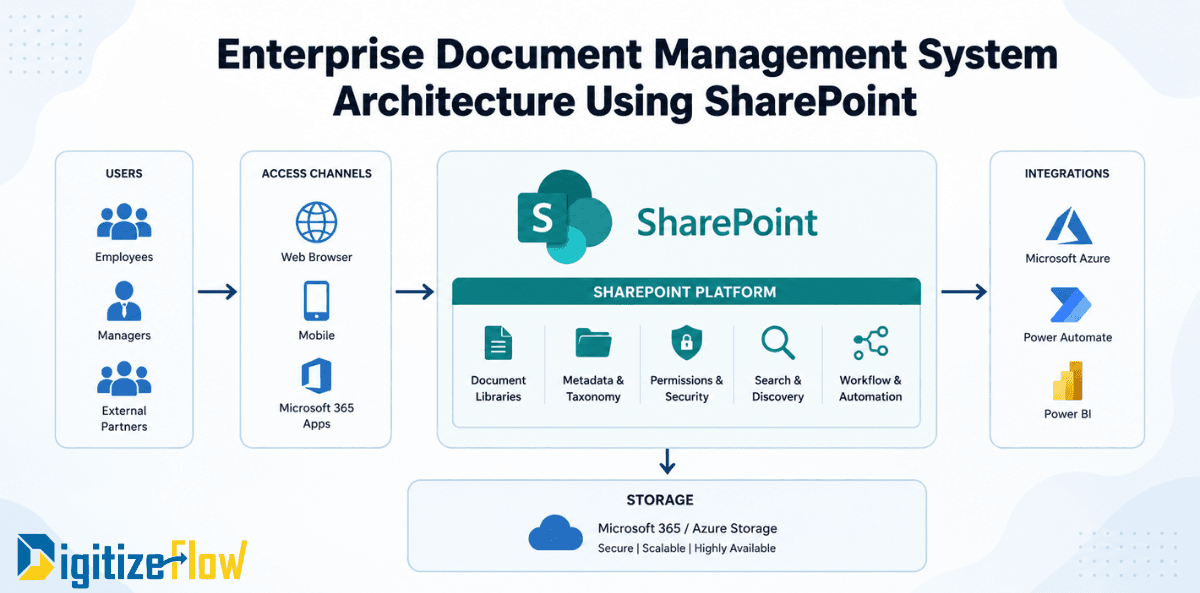
Enterprise Document Management System Architecture Using SharePoint
Introduction
In today's digital workplace, organizations generate and manage thousands of documents every day—from contracts and invoices to HR records, policies, project files, and customer documentation. As businesses grow, relying on traditional file servers or scattered storage locations often leads to duplicated documents, security risks, slow collaboration, and inefficient workflows.
To overcome these challenges, enterprises are adopting SharePoint as the foundation of their Enterprise Document Management System (EDMS). More than just a document repository, SharePoint provides a centralized, secure, and intelligent platform that enables organizations to manage content efficiently, automate business processes, and improve collaboration across departments.
This article explores the architecture of an Enterprise Document Management System using SharePoint and explains how each component contributes to a scalable and future-ready digital workplace.
Why Choose SharePoint for Enterprise Document Management?
Microsoft SharePoint has evolved into one of the world's leading enterprise content management platforms. Integrated with Microsoft 365, it enables organizations to securely store, organize, share, and govern documents while seamlessly connecting with tools such as Microsoft Teams, Power Automate, Power BI, and Microsoft Azure.
Key advantages of using SharePoint include:
Centralized document storage
Enterprise-grade security and compliance
Intelligent document search
Metadata-driven organization
Version control and audit history
Workflow automation
Cloud accessibility
Seamless Microsoft 365 integration
Instead of simply storing files, SharePoint transforms documents into valuable business assets that support productivity and informed decision-making.
Enterprise Document Management System Architecture Using SharePoint
A well-designed SharePoint architecture consists of several interconnected layers that work together to ensure secure document management, efficient collaboration, and business process automation.
1. Users
At the first layer are the people who interact with the system.
Typical users include:
Employees
Managers
External Partners
Each user is granted access based on their role within the organization, ensuring that sensitive information remains protected while enabling seamless collaboration.
2. Access Channels
SharePoint provides multiple access methods, allowing users to work from virtually anywhere.
Users can access documents through:
Web Browser
SharePoint Mobile App
Microsoft 365 Applications
Microsoft Teams Integration
This flexibility supports remote work, hybrid workplaces, and mobile productivity while ensuring a consistent user experience across devices.
3. SharePoint Platform
The SharePoint platform serves as the core of the document management architecture.
Document Libraries
Document Libraries act as centralized repositories where files are securely stored and organized. They support version history, document check-in/check-out, co-authoring, and easy collaboration.
Rather than maintaining multiple copies of the same document, teams always work on a single source of truth.
Metadata & Taxonomy
Instead of relying on complex folder structures, SharePoint uses metadata to classify documents.
Examples of metadata include:
Department
Project
Customer
Document Type
Status
Owner
Created Date
A well-designed taxonomy improves search accuracy, simplifies document organization, and enables automated business processes.
Permissions & Security
Security is one of SharePoint's strongest capabilities.
Organizations can implement:
Role-Based Access Control (RBAC)
Multi-Factor Authentication (MFA)
Document-level permissions
Data Loss Prevention (DLP)
Microsoft Purview compliance policies
Audit logs
Encryption for data at rest and in transit
These features help organizations protect sensitive business information while meeting regulatory requirements.
Search & Discovery
As document volumes increase, finding information quickly becomes critical.
SharePoint's intelligent search enables users to locate files using:
Keywords
Metadata
Document properties
Content within documents
Filters and refiners
Powered by Microsoft Search, users can quickly discover the information they need without navigating through multiple folders.
Workflow & Automation
Modern document management extends beyond storage—it automates business processes.
Using Power Automate, organizations can automate workflows such as:
Document approvals
Contract review processes
HR onboarding
Purchase request approvals
Invoice processing
Policy publishing
Notification and reminder emails
Automation reduces manual effort, minimizes errors, and accelerates business operations.
Storage Layer
At the infrastructure level, SharePoint Online securely stores enterprise documents within Microsoft 365 and Microsoft Azure Storage.
This cloud-based architecture provides:
High availability
Automatic backup and recovery
Scalability
Disaster recovery
Enterprise-grade security
Global accessibility
Organizations no longer need to manage complex on-premises storage infrastructure while benefiting from Microsoft's secure cloud environment.
Integration with Microsoft Ecosystem
One of SharePoint's greatest strengths is its seamless integration with the Microsoft ecosystem.
Microsoft Azure
Azure provides identity management, security services, cloud infrastructure, and advanced AI capabilities that enhance the overall document management solution.
Power Automate
Power Automate connects SharePoint with hundreds of applications, enabling organizations to automate repetitive tasks and streamline business workflows.
Power BI
Power BI transforms SharePoint data into interactive dashboards and reports, giving decision-makers real-time insights into document usage, workflow performance, and operational efficiency.
Together, these integrations create a connected digital workplace where information flows seamlessly across systems.
Benefits of SharePoint-Based Document Management
Organizations implementing a SharePoint-based Enterprise Document Management System gain significant business advantages, including:
Improved collaboration across departments
Centralized document management
Faster document retrieval
Enhanced security and access control
Automated business workflows
Version control and document history
Regulatory compliance and governance
Reduced operational costs
Increased employee productivity
Better decision-making through integrated analytics
These benefits help organizations work smarter, reduce administrative overhead, and accelerate digital transformation initiatives.
Best Practices for Building a SharePoint EDMS
To maximize the value of your SharePoint implementation, consider these best practices:
Design a clear information architecture before creating document libraries.
Use metadata instead of deep folder hierarchies.
Implement role-based permissions to protect sensitive information.
Enable versioning for all critical document libraries.
Automate approval workflows with Power Automate.
Apply retention labels and compliance policies using Microsoft Purview.
Regularly review governance policies and user permissions.
Integrate SharePoint with Microsoft Teams for seamless collaboration.
Following these practices ensures a scalable, secure, and user-friendly document management environment.
Conclusion
A modern Enterprise Document Management System is more than a place to store files it is a strategic platform that empowers organizations to manage information securely, collaborate efficiently, and automate business processes.
With SharePoint at its core, enterprises can build a centralized document management architecture that combines intelligent search, metadata-driven organization, robust security, workflow automation, and seamless integration with the Microsoft ecosystem.
As digital transformation continues to reshape the business landscape, investing in a SharePoint-based Enterprise Document Management System enables organizations to improve operational efficiency, strengthen governance, and create a smarter, more connected workplace that is ready for the future.